Talk: NCSU Future of Games Series - Advancing AR as a New Medium: Authoring, Evaluation, and Deployment, Maribeth Gandy, Georgia Tech - Tuesday at 10

Forwarded message:
From: R. Michael Young <young@csc.ncsu.edu>

Future of Games Speaker Series

Speaker: Maribeth Gandy , Interactive Media Technology Center, Georgia Tech

Title: Advancing AR as a New Medium: Authoring, Evaluation, and Deployment

Date: Tuesday October 30, 2012
Time: 10:00 AM
Place: 3211, EBII; NCSU Centennial Campus (click for courtesy parking request)

Abstract:

Augmented Reality (AR) overlays virtual content, such as computer generated graphics, on the physical world. The augmented view of the world can be presented to the user via a head mounted display, a tablet/mobile device, or projection on the physical space around the user. While Ivan Sutherland first presented the concept of the “Ultimate Display� in 1965, it was not possible to truly implement augmented reality applications until almost 25 years later. Therefore, the field of AR research is usually considered to have begun in the early 90’s. In this 20-year period, AR has gone from being viewed as a heavyweight technology, only appropriate for industrial and military applications, to a new medium for art, games and entertainment applications. The evolution of the field is due in part to the extensive research that has gone into exploring the AR application space, but also the recent rise of powerful mobile devices that make it easy to deploy a wide-variety of AR appl!
ications to consumers.

This is a critical moment for the field of AR. Over the past three years, AR technology has become accessible outside of computer science research labs. At first this was mainly HCI researchers, but now we see participation from a variety of groups including game developers, visual and performance artists, user experience experts, toy designers, web developers, and entrepreneurs. As a result, there is an increased demand for tools and techniques to support AR experience design, evaluation, development, and deployment that fully address the needs of these diverse groups.

Low-level AR research in computer vision, graphics, sensors, and optics is, of course, critical to the success and growth of AR. However, my research focuses on higher level questions regarding what applications are appropriate for AR, how effective AR applications can be designed, and, most importantly, how we can support the participation of makers from outside the AR research domain. In this talk I will discuss the three intertwined research domains that are critical to the advancement of AR as a new medium: authoring, evaluation, and deployment.

Short Bio:

Maribeth Gandy is the Director of the Interactive Media Technology Center and the Associate Director of Interactive Media in the Institute for People and Technology at Georgia Tech. She received a B.S. in Computer Engineering as well as a M.S. and Ph.D. in Computer Science from Georgia Tech. In her twelve years as a research faculty member her work has been focused on the intersection of technology for augmented reality, accessibility/disability, human computer interaction, and gaming. She has developed computer-based experiences for entertainment and informal education in a variety of forms including augmented reality, virtual, and mobile. She also teaches the “Video Game Design” and “Computer Audio” course in the College of Computing at Georgia Tech. In her AR research, she is interested in advancing AR as a new medium by focusing on authoring, evaluation, and deployment. She was the lead architect on a large open source software project called the Designer’s Augmented R!
eality Toolkit (DART), which had thousands of users and was used to create a variety of large-scale AR systems. She was also co-PI on an NSF grant focused on the development of presence metrics for measuring engagement in AR environments using qualitative and quantitative data. She is currently collaborating on the creation of an open source AR web browser called Argon. She is also interested in the use of gaming interfaces for health and wellness. Currently, she is the co-PI on an NSF grant exploring the concept of cognitive gaming for older adults. The goal is to both isolate what components are necessary in an activity for it to have general cognitive benefits and to craft a custom game based on these guidelines that is accessible and compelling for an older player. Previously, she led a project funded by Georgia Tech’s Health Systems Institute to develop home-based computer games for stroke rehabilitation. For seven years she worked in the fields of disability and acce!
ssibility as a project director in the Wireless RERC (through !
the Shep
ard Center in Atlanta and Georgia Tech) and generated guidelines for the universal design and user centered design process with disabled persons. In her consulting work she has built commercial games, designed a home medical device for older adults, enhanced live rock concerts, and worked with startup companies to develop AR business models and products.

Talk: Future of Games Series - Virtual Humans by Stacy Marsella, USC/ICT - Monday at 11

Forwarded message:
From: R. Michael Young <young@csc.ncsu.edu>

Future of Games Speaker Series

Speaker: Stacy Marsella , USC/ICT

Talk Title: Virtual Humans

Date: Monday October 29, 2012
Time: 11:00 AM
Place: 3211, EBII; NCSU Centennial Campus (click for courtesy parking request)

Abstract:

Virtual humans are autonomous virtual characters that can have meaningful interactions with human users. They can reason about the environment, understand and express emotion, and communicate using speech and gesture. I will discuss various application areas of virtual humans in education, health intervention and entertainment. I will then go on to discuss the design of virtual humans with specific focus on their expressive capabilities.

Short Bio:

Stacy C. Marsella is a Research Associate Professor in the Department of Computer Science at the University of Southern California, Associate Director of Social Simulation Research at the Institute for Creative Technologies (ICT) and a co-director of USC’s Computational Emotion Group. His general research interest is in the computational modeling of cognition, emotion and social behavior, both as a basic research methodology in the study of human behavior as well as the use of these computational models in a range of gaming and analysis applications. His current research spans the interplay of emotion and cognition, modeling of the influence that beliefs about the mental processes of others have on social interaction and the role of nonverbal behavior in face-to-face interaction. He has extensive experience in the application of these models to the design of virtual humans, software entities that look human and can interact with humans in a virtual environment using spoken!
dialog. He is an associate editor of IEEE Transactions on Affective Computing and a member of the steering committee of the Intelligent Virtual Agents conference, as well as a member of the International Society for Research on Emotions (ISRE). Professor Marsella has published over 150 technical articles and received the Association for Computing Machinery's (ACM/SIGART) 2010 Autonomous Agents Research Award, for research influencing the field of autonomous agents.

Announcement: more CG stuff on wiki

Folks,

I've put more CG stuff on the wiki, for your programming pleasure.

Best,

Ben

Event: NSF Fellowship Application Reviews @ Thu Oct 25 6:45pm - 8pm (tmbarnes@ncsu.edu)

invite.ics Download this file

Look like a useful seminar.


Dear education informatics and games students,
Next Thursday we will have a meeting for all students wishing to apply for NSF and other grad fellowships to get together, and review past successful fellowship applications and review each other's draft materials to apply for fellowships.

People who should come: seniors and 1st and 2nd year grad students
AND grad students with fellowships
AND anyone else interested in getting grad school $$

I've requested EBII 3211, I'll confirm ASAP.

NSF Fellowship Application Reviews

Review NSF and other fellowship proposals for undergrads and new graduates applying this fall. There might be food.
When
Thu Oct 25 6:45pm – 8pm 
Eastern Time
Where
EB II (map)
Calendar
tmbarnes@ncsu.edu
Who
Tiffany Barnes
Going?   Yes - Maybe - No    more options »

Invitation from Google Calendar

You are receiving this email at the account tmbarnes@ncsu.edu because you are subscribed for invitations on calendar tmbarnes@ncsu.edu.

To stop receiving these notifications, please log in to https://www.google.com/calendar/ and change your notification settings for this calendar.


Assignment 3

Local lighting, depth buffering and basic shader coding
Due: by class time November 8 at this link.

Goal:

In this assignment you will learn the basics of OpenGL shader coding by implementing phong shaders with z-buffering in shader code.

Basic grading:

The components of this assignment will be graded as follows:
  • 10% Properly turned in assignment
  • 15% Render the triangles described in an obj file without shaders, in white
  • 15% Render the triangles without shaders, with z-buffering, Blinn-Phong illumination and Gouraud shading
  • 20% Render the triangles using shaders, in white
  • 30% Render the triangles using shaders, with Blinn-Phong illumination and Phong shading
  • 10% Render the triangles using shaders, with Blinn-Phong illumination, Phong shading and z-buffering 
  • Participation credit: You can receive participation credit (outside of this assignment) for posting your result, good or bad, on the class forum!

General notes:

You need only display one image. As you progress through the assignment, you can use any improved image to replace the previous (e.g. don't show parts 1, 2 and 3, just 3). Yes, you can earn 40% without ever programming shaders.

All vertex locations should be described in world coordinates, meaning they do not require any transformation. Locate the eye at (0 0 -2), with a view up vector of [0 1 0] and a look at vector of [0 0 1]. Locate the front clipping plane a distance of 1 from the eye, and the back clipping plane a distance of 3. You may assume that the viewing window is a 2x2 square centered on the front clipping plane, and aligned with world the coordinate axes. With this scheme, you can ensure that everything in the world is in view if it is located in a 2x2x2 box centered at the origin. Use perspective projection. Put a white (1,1,1) light at location (0,5,0).

You may make your interface window only 256x256 in size. This will speed testing of your ray casting. We will test your program with the test cube, as well as several other obj files, some of which you can find here, others which you cannot.

Part 0: Properly turned in assignment

Turn in both an executable and source. Your assignment should run without any missing libraries, and compile without any missing references. Submit a readme.txt file if there is any configurable behavior. If you wish to claim any extra credit, list those claims in the readme file, along with any needed details.

Part 1: Using OpenGL, render the triangles in white

Your program should read in the file input.obj. Your parser should not halt if it doesn't recognize a line, instead it should ignore it. You can ignore colors and normals for this part of the assignment. Render the triangles contained in the obj file in white.

Part 2: Using OpenGL, render lit triangles

You can now no longer ignore colors and normals, and need to worry about depth. Turn on depth buffering, local Blinn-Phong lighting, Gouraud shading. You should see the same triangles you rendered before, but with the same sort of lighting and shading you saw on the first assignment's triangle, with every triangle fragment having a slightly different color. You should also see occlusion.

Part 3: With shaders, render white triangles

Transform and project each vertex in a vertex shader. For each fragment, assign it a white color. Don't worry about colors, normals, or depth.

Part 4: With shaders, render lit triangles

As above, but for each fragment, calculate and output the Blinn-Phong color. No need to worry about depth.

Part 5: With shaders, render lit, occluded triangles 

As above, but for each fragment, calculate its depth and apply z-buffering.

Participation credit:

Please remember that you can get participation credit outside this assignment for posting your imagery, good or bad, on the course forum or Voicethread.

Extra credit grading:

Extra credit opportunities include the following, with others possible with instructor approval:
  • 5% support arbitrarily sized images (and interface windows)
  • 5% support multiple obj files and arbitrary modeling coordinates
  • 5% support arbitrary viewing setups
  • 5% support off-axis and rectangular projections
  • 5% support multiple lights at arbitrary locations
  • 15% add texture mapping
  • 25% add a mode that uses BSP trees for occlusion rather than z-buffering.

Extra credit: Arbitrarily sized images and interface windows

Read in an additional window.txt file that one line, lists the width and height of the interface window. Size your interface window to match, and change the aspect ratio of the viewing window to match.

Extra credit: Multiple obj files and arbitrary modeling coordinates

Read in an additional world.txt file that on each line, references an obj file and its associated modeling transform (a 4x4 matrix). Read in, transform and display all the named obj files before rendering them.

Extra credit: Support arbitrary viewing setups

Read in an additional view.txt file that lists the eye's location, the view up, and the look at vectors, each on a different line. Render the scene with these viewing parameters. Note that with bad viewing parameters, you will not see the model.

Extra credit: Support off-axis and rectangular projections

Read in an additional project.txt file that lists the viewing window's top, right, bottom and left Y, X, Y, and X coordinates (four numbers) on one line. Render the scene with these new projection parameters. Note that if you also perform the arbitrary viewing extra credit, these coordinates may not be in world space! Also with bad projection parameters, you will not see the model. Finally, note that your viewing window's and interface window's aspect ratios may not match, if you implement both extra credits. 

Extra credit: Multiple and arbitrarily located lights

Read in an additional lights.txt file that on each line, describes the location and color of a light (use one triple for a light's color, with its ambient, diffuse and specular colors the same). Render the scene with these lights. 

Extra credit: Add texture mapping 

Using materials and texture coordinates, map textures onto some of your models, and display them. Make sure to blend lighting and texture colors so that you can see the effects of both.

Extra credit: Use BSP trees for hidden surface removal

Turn off z-buffering, build a BSP tree, then in each frame, traverse it to produce a depth sort. Render the triangles in that order.

Announcement: grades so far

Folks,

I've graded most everything I have so far and put it on Moodle, including program 2 on ray casting.

Some notes:
  • When turning in programming assignments, please make sure you include executables, with all needed dlls. I would like portable zip installs, not msis or setups (this is a change from previous).
  • In a few cases, I haven't assigned a grade, but have commented. So check your comments too.
  • If you are having trouble with ray casting, you may want to turn in what you have by class tomorrow, when the late penalty switches from 9% to 27%. OpenGL by itself is worth nearly half credit. Keep in mind this entire assignment is only worth 10% of your final mark!
Please let me know if you have any questions.

Best,

Ben

Announcment: submission link for assignment 2

Hey folks,

Here is the submission link for assignment 2!

Best,

Ben

Find: The iPhone 5 Display - Thoroughly Analyzed

Atech either its usual thorough job. 

The iPhone 5 Display: Thoroughly Analyzed

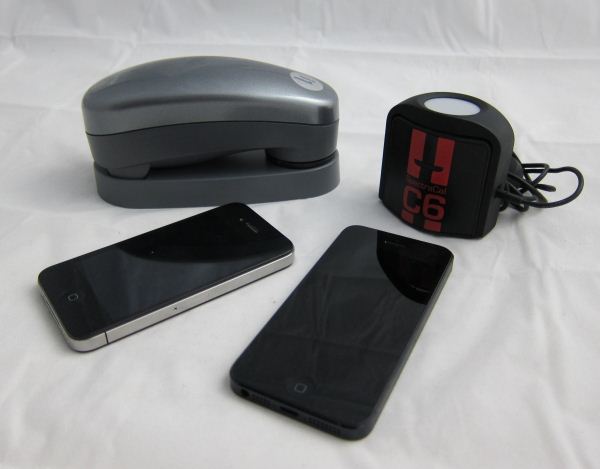
When Apple rolled out the iPhone 5, they announced that it had a full sRGB gamut, which the new iPad almost achieves and would be a substantial improvement over the 4 and 4S displays. The slight increase in screen resolution and size means we are looking at a new panel than the previous generations used as well, with the new panel being speced at 800:1 contrast ratio and 500 nits of brightness. I don’t have a 4S to test, but used my iPhone 4 that was bought on launch day and has been in use since then for comparison. Numbers were run using CalMAN 5 software, and a SpectraCal C6 colorimeter that was profiled from an i1Pro spectrometer. All readings are the average of three measurements from the C6, except for very dark readings where ten measurements were taken for more accuracy.

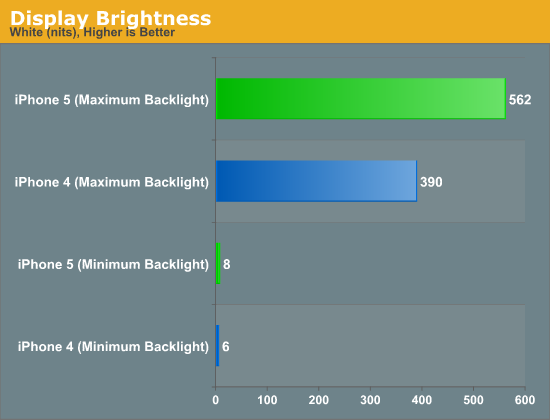
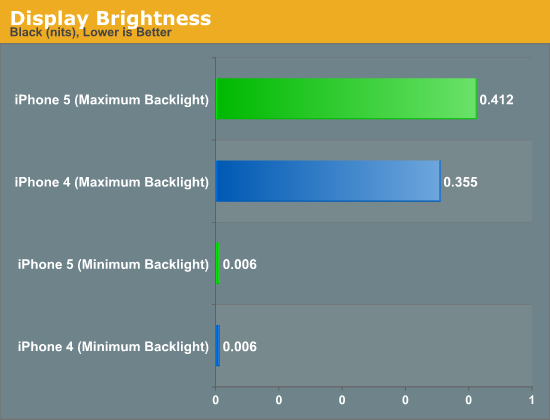
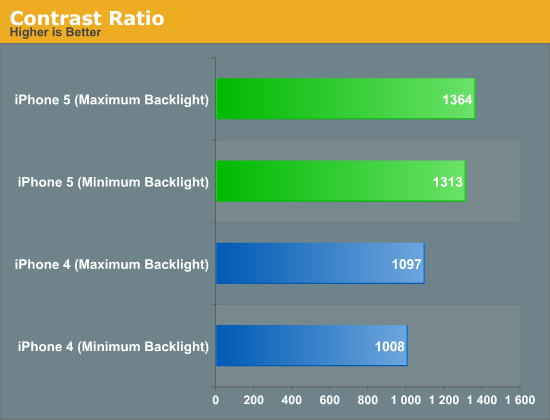
For comparing the minimum black and white levels in the iPhone 4 and 5, I set the brightness to the minimum level where I could get a reading from a black screen. At the minimum value I couldn’t get any reading, which indicates that it’s below the 0.001 threshhold that the C6 is capable of reading. Both phones had a minimum black level reading of 0.006 nits, but the iPhone 4 had a white level of 5.669 nits compared to the iPhone 5 and its reading of 8.303 nits. This gives us contrast ratios of 1008:1 for the iPhone 4 and 1313:1 for the iPhone 5. Both are ahead of the specified numbers, but the iPhone 5 is clearly better here.

At maximum brightness, the iPhone 4 has a maximum white output of 390 nits, and the iPhone 5 clearly trumps that with 562 nits. The backlight of the iPhone 4 could have become slightly dimmer over time, but using LEDs it really should not have faded much. Black levels for the phones are 0.355 for the iPhone 4 and 0.412 for the iPhone 5. This gives us contrast ratios of 1097:1 for the iPhone 4 and 1364:1 for the iPhone 5. Clearly contrast levels have been improved here, despite the move to a larger screen that sometimes can affect them.

Display Brightness

Display Brightness

Contrast Ratio

Looking at the grayscale, the iPhone 4 puts out an average dE2000 of almost 10 across the spectrum. The grayscale has a very noticeab...

Find: Maybe this change will be good - Cliff Bleszinski leaves Epic Games

Creative genius Cliff Bleszinski leaves Epic Games

Cliff BleszinskiIn a blog post, Cary-based Epic Games tells its millions of fans worldwide that Cliff Bleszinski, a driving creative force behind many of its its such as "Gears of War," has left the firm. Bleszinki says he needs "a much needed break."